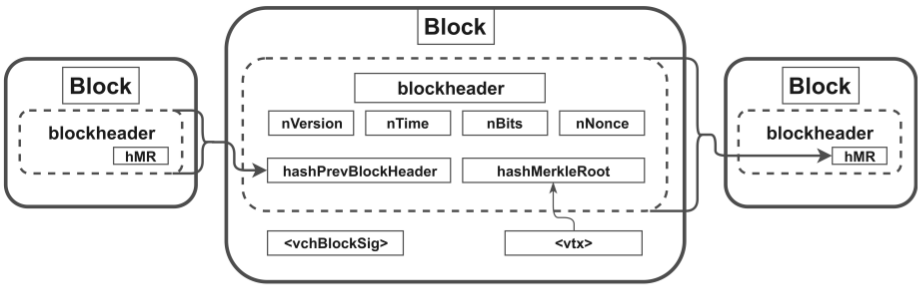
As a fork of Litecoin, Gridcoin-Research is a blockchain based cryptocurrency and shares many concepts with Bitcoin. While Bitcoin's transaction data structure and concept is used in an unmodified version, Gridcoin-Research utilizes a slightly modified block structure. A Gridcoin-Research block encapsulates a header and body. The header contains needed meta information and the body encloses transactions. Due to the
field, which contains the hash of the previous block-header, the blocks are linked and form the distributed ledger, the blockchain. Blocks in the blockchain are created by so called minters. Each block stores a list of recent transactions in its body and further metadata in its header. To ensure that all transactions are confirmed in a decisive order, each block-header field contains a reference to the previous one. To regulate the rate in which new blocks are appended to the blockchain and to reward BOINC contribution, Gridcoin-Research implements another concept called Proof-of-Research. Proof-of-Research is a combination of a new overhauled Proof-of-BOINC concept, which was originally designed for Gridcoin-Classic and the improved Proof-of-Stake concept, inspired by alternative cryptocurrencies.
In order to understand the attacks we need to introduce some Gridcoin specific terms.
Proof-of-Stake is a Proof-of-Work replacement, which was first utilized by the cryptocurrency Peercoin in 2012. This alternative concept was developed to showcase a working Bitcoin related currency with low power consumption. Therefore, the block generation process has been overhauled. To create a new valid block for the Gridcoin blockchain the following inequality have to be satisfied:
SHA256(SHA256(kernel)) < Target * UTXO Value + RSAWeight
The kernel value represents the concatenation of the parameters listed in Table 2. The referenced unspent transaction output (
UTXO) must be at least 16 hours old. The so called
RSAWeight is an input value to the kernel computation, it's indicates the average BOINC work, done by a Gridcoin minter.
In direct comparison to Bitcoin's Proof-of-Work concept, it is notable that the hash of the previous block-header is not part of the kernel. Consequently, it is theoretically possible to create a block at any previous point in time in the past. To prevent this, Gridcoin-Research creates fixed interval checkpoint blocks. Once a checkpoint block is synchronized with the network, blocks with older time stamps became invalid. Considering the nature of the used kernel fields, a client with only one
UTXO is able to perform a hash calculation each time
nTime is updated. This occurs every second, as
nTime is a UNIX time stamp. To be able to change the
txPrev fields and thereby increase his hash rate, he needs to gain more
UTXO by purchasing coins. Note that high
UTXO and
RSAWeight values mitigate the difficulty of the cryptographic puzzle, which increase the chance of finding a valid kernel.
RSAWeight was explained above. Once a sufficient kernel has been found, the referenced
UTXO is spent in a transaction to the creator of the block and included in the generated block. This consumes the old
UTXO and generates a new one with the age of zero.
The Gridcoin-Research concept does not require much electrical power, because the maximum hash rate of an entity is limited by its owned amount of
UTXOs with suitable age.
- A minter (Researcher) participates in a BOINC project A and performs computational work for it. In return the project server increases the users Total Credit value on the server. The server therefore stores the minter's email address, iCPID, eCPID and RAC.
- Statistical websites contact project server and down-load the statistics for all users from the project server (A).
- After the user earns credits, his RAC increases. Consequently, this eases the finding of a solution for the Proof-of-Stake cryptographic puzzle, and the user can create (mint) a block and broadcast it to the Gridcoin network.
- Another minter (Investor or Researcher) will receive the block and validate it. Therefore, he extracts the values from the BOINCHash data structure inside the block.
- The minter uses the eCPID from the BOINCHash to request the RAC and other needed values from a statistical website and compares them to the data extracted from the BOINCHash structure, in the event that they are equal and the block solves the cryptographic puzzle, the block is accepted.
 |
| Fig. 2: Gridcoin architecture and minting process |
Reward calculation
The total reward for a solved block is called the Subsidy and is computed as the sum of the Proof-of-Research and the Proof-of-Stake reward.
If a minter operates as an Investor (without BOINC contribution), the eCPID is set to the string Investor and all other fields of the
BOINCHash are zeroed. An Investor receives only a relatively small Proof-of-Stake reward.
Because the Proof-of-Research reward is much higher than its Proof-of-Stake counterpart, contributing to BOINC projects is more worth the effort.
Statistic Website
At the
beginning of the blog post, the core concept behind BOINC was described. One functionality is the creation of BOINC Credits for users, who perform computational work for the project server. This increases the competition between BOINC users and therefore has a positive effect on the amount of computational work users commit. Different websites 4 collect credit information of BOINC users from known project servers and present them online. The Gridcoin client compares the RAC and total credit values stored in a new minted block with the values stored on
cpid.gridcoin.us:5000/get_user.php?cpid=eCPID where eCPID is the actual value of the researcher. If there are differences, the client declines the block. In short, statistical websites are used as control instance for Gridcoin. It is obvious that gridcoin.us administrators are able to modify values of any user. Thus, they are able to manipulate the amount of Gridcoins a minter gets for his computational work. This is crucial for the trust level and undermines the general decentralized structure of a cryptocurrency.
Project Servers
Gridcoin utilizes BOINC projects to outsource meaningful computation tasks from the currency. For many known meaningful problems there exist project servers 5 that validate solutions submitted by users, 6 and decide how many credits the users receive for their solutions. Therefore, the project servers can indirectly control the amount of Gridcoins a minter gets for his minted block via the total credit value. As a result, a Gridcoin user also needs to trust the project administrators. This is very critical since there is no transparency in the credit system of project server. If you want to know why decentralization is not yet an option, see our paper from
WOOT'17.
Attacks
In addition to the trust a Gridcoin user needs to put into the project server and statistic website administrators, Gridcoin suffers from serious flaws which allows the revelation of minter identities or even stealing coins. Our attacks do not rely on the Gridcoin trust issues and the attacker does not need to be in possession of specific server administrative rights. We assume the following two simple attackers with limited capability sets. The first one, is the
blockchain grabber which can download the Gridcoin blockchain from an Internet resource and runs a program on the downloaded data. The second one, the G
ridcoin attacker, acts as a normal Gridcoin user, but uses a modified
Gridcoin client version, in order to run our attacks.
Interestingly, the developer of Gridcoin tried to make the source code analysis somewhat harder, by obfuscating the
source code of relevant functions.
 |
| Fig. 3: Obfuscated source code in Gridcoin [Source] |
Grab Gridcoin user email addresses
In order to protect the email addresses of Gridcoin Researchers, neither BOINC project websites nor statistical websites directly include these privacy critical data. The statistical websites only include
eCPID entries, which are used to reward Gridcoin Researchers. However, the email addresses are hidden inside the computation of the
BOINCHash (cf.
Table 1). A
BOINCHash is created every time a Researcher mints a new block and includes a
CPIDv2 value. The
CPIDv2 value contains an obfuscated email address with
iCPID and a hash over the previous blockchain block.
By collecting the blockchain data and reversing the obfuscation function (cf.
Figure 4 and
Figure 7), the attacker gets all email addresses and
iCPIDs ever used by Gridcoin Researchers. See the reversed obfuscation function in
Figure 4 and
Figure 5.
Evaluation
We implemented a deobfuscation function (cf. Figure 7) and executed it on the blockchain. This way, we were able to retrieve all (2709) BOINC email addresses and
iCPIDs used by Gridcoin Researchers. This is a serious privacy issue and we address it with our fix (cf.
The Fix).
Steal Gridcoin users BOINC reward
The previous attack through deobfuscation allows us to retrieve
iCPID values and email addresses. Thus, we have all values needed to create a new legitimate
eCPID. This is required because the
CPIDv2 contains the last block hash and requires a re-computation for every new block it should be used in. We use this fact in the following attack and show how to steal the computational work from another legitimate Gridcoin Researcher by mining a new Gridcoin block with forged BOINC information. Throughout this last part of the post, we assume the Gridcoin Minter attacker model where the attacker has a valid Gridcoin account and can create new blocks. However, the attacker does not perform any BOINC work.
 |
| Tab. 1: BOINCHash structure as stored and used in the Gridcoin blockchain. |
As stated at the beginning of the blog post, the pre-image of the
eCPID is stored obfuscated in every Gridcoin block, which contains a Proof-of-Research reward. We gathered one pre-image from the minted blocks of our victim and deobfuscated it. Thus, we know the values of the
iCPID, and the email address of our victim. Subsequently, use the hash of the last block created by the network and use these three values to create a valid
CPIDv2. Afterwards we constructed a new block. In the block we also store the current BOINC values of our victim, which we can gather from the statistics websites. The final block is afterwards sent into the Gridcoin network. In case all values are computed correctly by the attacker, the network will accept the block, and resulting in a higher reward for the attacker, consisting of Proof-of-Stake and Proof-of-Research reward.
 |  |
| Fig. 4: Obfuscation function | Fig. 5: Deobfuscation function |
Evaluation
In order to verify our attacks practically, we created two virtual machines (R and A), both running Ubuntu 14.04.3 LTS. The virtual machine R contained a legitimate BOINC and Gridcoin instance. It represented the setup of a normal Gridcoin Researcher. The second machine A contained a modified Gridcoin-Research client 3.5.6.8 version, which tried to steal the Proof-of-Research reward of virtual machine R. Thus, we did not steal reward of other legitimate users. The victim BOINC client was attached to the SETI@home project 11 with the eCPID 9f502770e61fc03d23d8e51adf7c6291.
The victim and the attacker were in possession of Gridcoins, enabling them to stake currency and to create new blocks.
 |
| Fig. 6: CPIDv2 calculation deobfuscated |
Initially both Gridcoin-Research clients retrieved the blockchain from other Gridcoin nodes in the Gridcoin network.
The Gridcoin
attack client made it possible to specify the victim email address, iCPID and target project. All these values can be retrieved from the downloaded blockchain and our previous attack via the reverseCPIDv2 function as shown in
Figure 7. The attack client read the iCPID and email address of the victim from a modified configuration file. All other values, for example,
RAC or
ResearchAge, were pulled from http://cpid.gridcoin.us:5000/get_user.php?cpid=. As soon as all values were received, the client attempted to create a new valid block.
 |
| Fig. 7: Reverse the CPIDv2 calculation to get iCPID and email address |
Once a block had been created and confirmed, the attacker received the increased coin reward with zero BOINC contribution done. The attack could only be detected by its victims because an outside user did not know the legitimate Gridcoin addresses a Researcher uses.
All blocks created with our victim's
eCPID are shown in
Table 2. Illegitimate blocks are highlighted. We were able to mint multiple illegitimate blocks, and thus stealing Research Age from our victim machine R. All nine blocks created and send by our attacker to the Gridcoin network passed the Gridcoin block verification, were confirmed multiple times, and are part of the current Gridcoin blockchain. During our testing timespan of approximately three weeks, the attacker machine was wrongfully rewarded with 72.4 Proof-of-Research generated Gridcoins, without any BOINC work. The results show that the attack is not only theoretically possible, but also very practical, feasible and effective. The attack results can be reproduced with our Gridcoin-Research-Attack client.
 |
| Tab. 2:Blocks minted with the victim's eCPID |
The Fix
In order to fix the security issue, we found one solution which does not require any changes to the BOINC source code nor the infrastructure. It is sufficient to change some parts of the already existing Gridcoin Beacon system. Thus, our solution is backwards compatible.
The current Gridcoin client utilizes so called Beacons to register new
eCPIDs and stores them as a transaction of 0.0001 Gridcoins in a Superblock which is created every 24 hours. A Beacon encloses the user's personal
eCPIDs, a corresponding unused (but irreversible)
CPIDv2, and the wallet's main Gridcoin payment address. Once the Superblock is created, the
eCPIDs is bound to one Gridcoin payment address. During the block verification process this bond is unfortunately not checked. Furthermore, the existing Beacon system does not use any strong asymmetric cryptography to ensure authenticity and integrity of the broadcasted data. We propose to extend the Beacon system with public key cryptography. In detail, we suggest that a user binds his fresh public key
PK_1 to a newly generated
eCPID, and then storing them together in a Superblock. An initial Beacon would therefore contain a hashed (e.g. SHA-256)
eCPID, the public key, a Nonce, and a cryptographic signature created with the corresponding secret key
SK_1 of the public key. This allows only the owner of the secret key to create valid signatures over blocks created with his
eCPID. Thus, an adversary first needs to forge a cryptographic signature before he can claim Proof-of-Research work of another Gridcoin user. Thus, he is not capable of stealing the reward of the user.
 |
| Beacon to create a eCPID, public/secret key pair bond |
For verification purposes nodes fetch the corresponding latest public key from one of the Superblocks. Furthermore, this Beacon structure allows a user to replace his previous public key associated with his
eCPID. This is realized by submitting a new Beacon with a new public key
PK_2, signed with his old secret key.
 |
| Beacon to update a eCPID, public/secret key pair bond |
All Beacons in the chain are verifiable and the latest public key is always authentic. The Nonce provide freshness for the signature input, and therefore prevent replay attacks against the Beacon system.
Note that the
eCPID needs to be completely unknown to the network, when sending the initial Beacon, for this concept to work as intended. The hash function ensures, that the Beacon does not reveal the fresh
eCPID. As a result, an attacker is unable to mint with a
eCPID even if he was able to intercept an initial Beacon and replaced the public key and signature with his own parameters, beforehand. This solution does not require any changes in the BOINC source code or the project servers.
Sign a block
In order to claim the Proof-of-Research reward for a newly created block, the Gridcoin minter computes a signature over the hash of the blockheader. Afterwards, he stores the resulting value at the end of the corresponding block in a new field. The private key used for the signature generation must correspond to the advertised public key by the user. It is important to note that the signature value is not part of the Merkle tree, and thus does not change the blockheader. In the end, the signature can then be verified by every other Gridcoin user via the advertised public key corresponding to the eCPID of the Gridcoin minter.
Responsible Disclosure
The attacks and the countermeasures were responsibly disclosed to the Gridcoin developer on the 14th of September, 2016. The developer used our proposed countermeasures and started to implement a new version. Since version 3.5.8.8, which is mandatory for all Gridcoin users, there exists an implementation, which contains countermeasures to our reward stealing attack.
See our
next blog post, why
Gridcoin is still insecure and should
not be used anymore.