Wednesday, May 20, 2020

C++ Std::String Buffer Overflow And Integer Overflow

Interators are usually implemented using signed integers like the typical "for (int i=0; ..." and in fact is the type used indexing "cstr[i]", most of methods use the signed int, int by default is signed.
Nevertheless, the "std::string::operator[]" index is size_t which is unsigned, and so does size(), and same happens with vectors.
Besides the operator[] lack of negative index control, I will explain this later.

Do the compilers doesn't warn about this?


If his code got a large input it would index a negative numer, let see g++ and clang++ warnings:


No warnings so many bugs out there...

In order to reproduce the crash we can load a big string or vector from file, for example:


I've implemented a loading function, getting the file size with tellg() and malloc to allocate the buffer, then in this case used as a string.
Let see how the compiler write asm code based on this c++ code.


So the string constructor, getting size and adding -2 is clear. Then come the operator<< to concat the strings.
Then we see the operator[] when it will crash with the negative index.
In assembly is more clear, it will call operator[] to get the value, and there will hapen the magic dereference happens. The operator[] will end up returning an invalid address that will crash at [RAX]


In gdb the operator[] is a  allq  0x555555555180 <_znst7__cxx1112basic_stringicst11char_traitsicesaiceeixem plt="">

(gdb) i r rsi
rsi            0xfffffffffffefffe  -65538


The implmementation of operator ins in those functions below:

(gdb) bt
#0  0x00007ffff7feebf3 in strcmp () from /lib64/ld-linux-x86-64.so.2
#1  0x00007ffff7fdc9a5 in check_match () from /lib64/ld-linux-x86-64.so.2
#2  0x00007ffff7fdce7b in do_lookup_x () from /lib64/ld-linux-x86-64.so.2
#3  0x00007ffff7fdd739 in _dl_lookup_symbol_x () from /lib64/ld-linux-x86-64.so.2
#4  0x00007ffff7fe1eb7 in _dl_fixup () from /lib64/ld-linux-x86-64.so.2
#5  0x00007ffff7fe88ee in _dl_runtime_resolve_xsavec () from /lib64/ld-linux-x86-64.so.2
#6  0x00005555555554b3 in main (argc=2, argv=0x7fffffffe118) at main.cpp:29

Then crashes on the MOVZX EAX, byte ptr [RAX]

Program received signal SIGSEGV, Segmentation fault.
0x00005555555554b3 in main (argc=2, argv=0x7fffffffe118) at main.cpp:29
29     cout << "penultimate byte is " << hex << s[i] << endl;
(gdb)


What about negative indexing in std::string::operator[] ?
It's exploitable!

In a C char array is known that having control of the index, we can address memory.
Let's see what happens with C++ strings:


The operator[] function call returns the address of string plus 10, and yes, we can do abitrary writes.


Note that gdb displays by default with at&t asm format wich the operands are in oposite order:


And having a string that is in the stack, controlling the index we can perform a write on the stack.


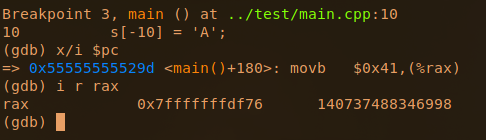
To make sure we are writing outside the string, I'm gonna do 3 writes:


 See below the command "i r rax" to view the address where the write will be performed.


The beginning of the std::string object is 0x7fffffffde50.
Write -10 writes before the string 0x7fffffffde46.
And write -100 segfaults because is writting in non paged address.


So, C++ std::string probably is not vulnerable to buffer overflow based in concatenation, but the std::string::operator[] lack of negative indexing control and this could create vulnerable and exploitable situations, some times caused by a signed used of the unsigned std::string.size()


Continue reading


Tuesday, May 19, 2020

System Hacking: Password Cracking Techniques And Types Of Passwords


This blog based on two major concepts:
  • Understand password-cracking techniques
  • Understand different types of passwords
  •  

The simplest way to crack the passwords

The first step is to access the system is that you should know how to crack the password of the target system. Passwords are the key element of information require to access the system, and users also selects passwords that are easy to guess such as mostly people has a passwords of their pet's name or room number etc to help them remember it. Because of this human factor, most password guessing is successful if some information is known about the target. Information gathering and reconnaissance can help give away information that will help a hacker guess a user's password.

Once a password is guessed or cracked, it can be the launching point for escalating privileges, executing applications, hiding files, and covering tracks. If guessing a password fails, then passwords may be cracked manually or with automated tools such as a dictionary or brute-force method.

Types of Passwords 

  • Only numbers
  • Only letters
  • Only special characters
  • Letters and numbers
  • Only letters and special characters 
  • Numbers, letters and special characters
A strong password is less susceptible to attack by a hacker. The following rules, proposed by the EC-Council, should be applied when you're creating a password, to protect it against attacks:
  • Must not contain any part of the user's account name
  • Must have a minimum of eight characters
  • Must contain characters from at least three of the following categories:
    • Non alphanumeric symbols ($,:"%@!#)
    • Numbers
    • Uppercase letters
    • Lowercase letters
A hacker may use different types of attacks in order to identify a password and gain further access to a system. The types of password attacks are as follows:

Passive Online

​Eavesdropping on network password exchanges. Passive online attacks
include sniffing, man-in-the-middle, and replay attacks. Moreover, a passive online attack is also known as sniffing the password on a wired or wireless network. A passive attack is not detectable to the end user. The password is captured during the authentication process and can then be compared against a dictionary file or word list. User account passwords are commonly hashed or encrypted when sent on the network to prevent unauthorized access and use. If the password is protected by encryption or hashing, special tools in the hacker's toolkit can be used to break the algorithm.

Another passive online attack is known as man-in-the-middle (MITM). In a MITM attack, the hacker intercepts the authentication request and forwards it to the server. By inserting a sniffer between the client and the server, the hacker is able to sniff both connections and capture passwords in the process.

A replay attack is also a passive online attack; it occurs when the hacker intercepts the password en route to the authentication server and then captures and resend the authentication packets for later authentication. In this manner, the hacker doesn't have to break the password or learn the password through MITM but rather captures the password and reuses the password-authentication packets later to authenticate as the client.

Active Online

Guessing the Administrator password. Active online attacks include auto-
mated password guessing. Moreover, The easiest way to gain administrator-level access to a system is to guess a simple password assuming the administrator used a simple password. Password guessing is an active online attack. It relies on the human factor involved in password creation and only works on weak
passwords.

Assuming that the NetBIOS TCP 139 port is open, the most effective method of breaking into a Windows NT or Windows 2000 system is password guessing. This is done by attempting to connect to an enumerated share ( IPC$ or C$ ) and trying a username and password combination. The most commonly used Administrator account and password combinations are words like Admin, Administrator, Sysadmin, or Password, or a null password.
A hacker may first try to connect to a default Admin$ , C$ , or C:\Windows share. To connect to the hidden C: drive share, for example, type the following command in the Run field (Start ➪ Run):

\\ip_address\c$

Automated programs can quickly generate dictionary files, word lists, or every possible combination of letters, numbers, and special characters and then attempt to log on using those credentials. Most systems prevent this type of attack by setting a maximum number of login attempts on a system before the account is locked.

In the following sections, we'll discuss how hackers can perform automated password guessing more closely, as well as countermeasures to such attacks.

Performing Automated Password Guessing

To speed up the guessing of a password, hackers use automated tools. An easy process for automating password guessing is to use the Windows shell commands based on the standard NET USE syntax. To create a simple automated password-guessing script, perform the following steps:
  1. Create a simple username and password file using Windows Notepad. Automated tools such as the Dictionary Generator are available to create this word list. Save the file on the C: drive as credentials.txt.
  2. Pipe this file using the FOR command: C:\> FOR /F "token=1, 2*" %i in (credentials.txt)
  3. Type net use \\targetIP\IPC$ %i /u: %j to use the credentials.txt file to attempt to log on to the target system's hidden share.

Offline Attacks

Offline attacks are performed from a location other than the actual computer where the passwords reside or were used. Offline attacks usually require physical access to the computer and copying the password file from the system onto removable media. The hacker then takes the file to another computer to perform the cracking. Several types of offline password attacks exist.

Types of AttackCharacteristicsPassword Example
Dictionary attackAttempts to use passwords from a list of dictionary wordsAdministrator
Hybrid attackSubstitutes numbers of symbols for password charactersAdm1n1strator
Brute-force attackTries all possible combinations of letters, numbers, and special charactersMs!tr245@F5a

A dictionary attack is the simplest and quickest type of attack. It's used to identify a password that is an actual word, which can be found in a dictionary. Most commonly, the attack uses a dictionary file of possible words, which is hashed using the same algorithm used by the authentication process. Then, the hashed dictionary words are compared with hashed passwords as the user logs on, or with passwords stored in a file on the server. The dictionary attack works only if the password is an actual dictionary word; therefore, this type of attack has some limitations. It can't be used against strong passwords containing numbers or other symbols.

A hybrid attack is the next level of attack a hacker attempts if the password can't be found using a dictionary attack. The hybrid attack starts with a dictionary file and substitutes numbers and symbols for characters in the password. For example, many users add the number 1 to the end of their password to meet strong password requirements. A hybrid attack is designed to find those types of anomalies in passwords.

The most time-consuming type of attack is a brute-force attack, which tries every possible combination of uppercase and lowercase letters, numbers, and symbols. A brute-force attack is the slowest of the three types of attacks because of the many possible combinations of characters in the password. However, brute force is effective; given enough time and processing power, all passwords can eventually be identified.Related word
  1. Live Hacking
  2. Hacking Cracking
  3. Hacking Quotes

OWASP Web 2.0 Project Update

Some of you likely recall the talk back in 2016 or so of updating the OWASP Foundation website to not appear so much like a...well, a wiki.  That talk was carried forward into 2017 and 2018 and, with each year, the proposal got pushed ahead as there were other, deeper projects to tackle.  With the arrival of 2019 and a firm project plan under the guidance of Mike McCamon, Executive Director, we are finally moving toward a functioning, modern website that will be a whole lot less...wiki-like.  The journey has been circuitous and, while we are not anywhere near complete, we have a set plan in place to bring it to fruition within the calendar year (second quarter of the year, actually).

TLDR: How Can You Help? 

There are certainly ways in which you can get involved now.  For instance, we are looking for a clean way to get wiki pages into GitHub markdown format for archival.  I have done some work here but there are parsing issues with some of the tools.  Do you know a good tool or have you done similar work?  Also, are you or do you know a good designer, someone familiar with GitHub pages that can provide some useful help and feedback along the way?  A Jekyll expert to help code a theme with a handful of templates would be a great addition.  In addition, we could use website server admins who could help with assigning redirects to maintain search integrity.  Finally, there will be a great many pages to move that we will also eventually need community involvement in.  

So, What Have We Done? 

Thus far we have researched various ideas for standing up a new site, including modifying the current wiki, spinning up our own web server, contracting a third party to host and build a new site, and also using existing infrastructure with our own content to launch a new face for OWASP.  Our discussions led us to a familiar place, one that nearly every developer in the OWASP space is familiar with: GitHub.   

In our conversations with GitHub, it became readily apparent that using the platform would be a win for the Foundation as well as GitHub.  Nearly everyone who runs a project at OWASP (documentation or otherwise) uses GitHub.  Because our target audience is also mostly developers we know that they are also very comfortable with the platform.  And while GitHub has a number of high profile companies using their GitHub Pages, the use of the platform as the basis for the entire website of the number one non-profit foundation in the application security sector is a big draw.

We have run with that GitHub Pages idea and have spent internal manpower on a proof of concept.  This proof of concept is less about the UX of the site than the functionality, the ability to utilize the authentication systems, and the ability to utilize automation to push out changes quickly.

Where Are We Now?

We are doing the final stages of website architecture. We are also planning what needs to be in the site, how the pieces will integrate with current projects and chapters, and how we might utilize the community to integrate the pieces so that we have a visually and functionally cohesive website that spans across multiple repositories.

What Is Next?

We will soon be looking for a modern website design that is responsive and clean.  We will begin using the knowledge gained from our proof of concept to build out the internals of the website and then we will start implementing the highest traffic pages and administrative areas into the new platform.  Once we have the big-ticket items moved we will start looking at what is left and moving over those pieces.  The eventual goal would be to have a new, modern website for the future of OWASP while keeping the wiki as an archive of really useful information.


We hope you are as excited as we are about the future of the OWASP Foundation website and will join us as we move toward a modern web presence.  If you have any questions or would like to volunteer your time, experience or knowledge, please contact me at harold.blankenship@owasp.com

Continue reading


  1. Hacking Games Online
  2. Elhacker Ip
  3. White Hacking
  4. Programa Hacker
  5. Hacking Ético
  6. Hacking With Arduino
  7. Hacking To The Gate
  8. Hacking Live
  9. Live Hacking

CEH: System Hacking, Cracking A Password, Understanding The LAN Manager Hash, NetBIOS DoS Attacks


Passwords are the key element of information require to access the system. Similarly, the first step is to access the system is that you should know how to crack the password of the target system. There is a fact that users selects passwords that are easy to guess. Once a password is guessed or cracked, it can be the launching point for escalating privileges, executing applications, hiding files, and covering tracks. If guessing a password fails, then passwords may be cracked manually or with automated tools such as a dictionary or brute-force method.

Cracking a Password

Passwords are stored in the Security Accounts Manager (SAM) file on a Windows system and in a password shadow file on a Linux system.

Manual password cracking involves attempting to log on with different passwords. The hacker follows these steps:
  1. Find a valid user account (such as Administrator or Guest).
  2. Create a list of possible passwords.
  3. Rank the passwords from high to low probability.
  4. Key in each password.
  5. Try again until a successful password is found.
A hacker can also create a script file that tries each password in a list. This is still considered manual cracking, but it's time consuming and not usually effective.

A more efficient way of cracking a password is to gain access to the password file on a system. Most systems hash (one-way encrypt) a password for storage on a system. During the logon process, the password entered by the user is hashed using the same algorithm and then compared to the hashed passwords stored in the file. A hacker can attempt to gain access to the hashing algorithm stored on the server instead of trying to guess or otherwise identify the password. If the hacker is successful, they can decrypt the passwords stored on the server.

Understanding the LAN Manager Hash

Windows 2000 uses NT LAN Manager (NTLM) hashing to secure passwords in transit on the network. Depending on the password, NTLM hashing can be weak and easy to break. For example, let's say that the password is 123456abcdef . When this password is encrypted with the NTLM algorithm, it's first converted to all uppercase: 123456ABCDEF . The password is padded with null (blank) characters to make it 14 characters long: 123456ABCDEF__ . Before the password is encrypted, the 14-character string is split in half: 123456A and
BCDEF__ . Each string is individually encrypted, and the results are concatenated:

123456A = 6BF11E04AFAB197F
BCDEF__ = F1E9FFDCC75575B15

The hash is 6BF11E04AFAB197FF1E9FFDCC75575B15 .

Cracking Windows 2000 Passwords

The SAM file in Windows contains the usernames and hashed passwords. It's located in the Windows\system32\config directory. The file is locked when the operating system is running so that a hacker can't attempt to copy the file while the machine is booted to Windows.

One option for copying the SAM file is to boot to an alternate operating system such as DOS or Linux with a boot CD. Alternately, the file can be copied from the repair directory. If a system administrator uses the RDISK feature of Windows to back up the system, then a compressed copy of the SAM file called SAM._ is created in C:\windows\repair . To expand this file, use the following command at the command prompt:

C:\>expand sam._ sam

After the file is uncompressed, a dictionary, hybrid, or brute-force attack can be run against the SAM file using a tool like L0phtCrack. A similar tool to L0phtcrack is Ophcrack.

Download and install ophcrack from http://ophcrack.sourceforge.net/

Redirecting the SMB Logon to the Attacker

Another way to discover passwords on a network is to redirect the Server Message Block (SMB) logon to an attacker's computer so that the passwords are sent to the hacker. In order to do this, the hacker must sniff the NTLM responses from the authentication server and trick the victim into attempting Windows authentication with the attacker's computer.

A common technique is to send the victim an email message with an embedded link to a fraudulent SMB server. When the link is clicked, the user unwittingly sends their credentials over the network.

SMBRelay

An SMB server that captures usernames and password hashes from incoming
SMB traffic. SMBRelay can also perform man-in-the-middle (MITM) attacks.

SMBRelay2

Similar to SMBRelay but uses NetBIOS names instead of IP addresses to capture usernames and passwords.

pwdump2

A program that extracts the password hashes from a SAM file on a Windows system. The extracted password hashes can then be run through L0phtCrack to break the passwords.

Samdump

Another program that extracts NTLM hashed passwords from a SAM file.

C2MYAZZ

A spyware program that makes Windows clients send their passwords as clear text. It displays usernames and their passwords as users attach to server resources.

NetBIOS DoS Attacks

A NetBIOS denial-of-service (DoS) attack sends a NetBIOS Name Release message to the NetBIOS Name Service on a target Windows systems and forces the system to place its name in conflict so that the name can no longer be used. This essentially blocks the client from participating in the NetBIOS network and creates a network DoS for that system.
  1. Start with a memorable phrase, such as "Maryhadalittlelamb"
  2. Change every other character to uppercase, resulting in "MaRyHaDaLiTtLeLaMb"
  3. Change a to @ and i to 1 to yield "M@RyH@D@L1TtLeL@Mb"
  4. Drop every other pair to result in a secure repeatable password or "M@H@L1LeMb"

Now you have a password that meets all the requirements, yet can be "remade" if necessary.
Related news

  1. Aprender Seguridad Informatica
  2. Hacking Traduccion
  3. Curso Hacking Etico
  4. Tipos De Hacker
  5. Hacking Desde Cero
  6. Hacking Growth
  7. Hacking Web Technologies Pdf
  8. Hacking Aves
  9. Etica Definicion
  10. Ingeniería Social. El Arte Del Hacking Personal Pdf
  11. Hacking Netflix Account
  12. Programas De Hacker
  13. Hacking Udemy
  14. Diferencia Entre Hacker Y Cracker

FB Marketplace Hack (going live now)

Quick reminder...

I'm going live now to share the lead gen playbook that took me from starving to 2-3 deals pending at all times.

Here's the link to join -> https://us02web.zoom.us/j/86785894193

I'm giving away the ad templates, scripts, posting schedule... everything!

Join to get the downloads.

Training starts now.

See you there!

-Chris Jones

CEH: Identifying Services & Scanning Ports | Gathering Network And Host Information | NMAP


CEH scanning methodology is the important step i.e. scanning for open ports over a network. Port is the technique used to scan for open ports. This methodology performed for the observation of the open and close ports running on the targeted machine. Port scanning gathered a valuable information about  the host and the weakness of the system more than ping sweep.

Network Mapping (NMAP)

Basically NMAP stands for Network Mapping. A free open source tool used for scanning ports, service detection, operating system detection and IP address detection of the targeted machine. Moreover, it performs a quick and efficient scanning a large number of machines in a single session to gathered information about ports and system connected to the network. It can be used over UNIX, LINUX and Windows.

There are some terminologies which we should understand directly whenever we heard like Open ports, Filtered ports and Unfiltered ports.

Open Ports means the target machine accepts incoming request on that port cause these ports are used to accept packets due to the configuration of TCP and UDP.

Filtered ports means the ports are usually opened but due to firewall or network filtering the nmap doesn't detect the open ports.

Unfiltered means the nmap is unable to determine whether the port is open or filtered  while the port is accessible.

Types Of NMAP Scan


Scan TypeDescription
Null Scan This scan is performed by both an ethical hackers and black hat hackers. This scan is used to identify the TCP port whether it is open or closed. Moreover, it only works over UNIX  based systems.
TCP connectThe attacker makes a full TCP connection to the target system. There's an opportunity to connect the specifically port which you want to connect with. SYN/ACK signal observed for open ports while RST/ACK signal observed for closed ports.
ACK scanDiscovering the state of firewall with the help ACK scan whether it is stateful or stateless. This scan is typically used for the detection of filtered ports if ports are filtered. Moreover, it only works over the UNIX based systems.
Windows scanThis type of scan is similar to the ACK scan but there is ability to detect an open ports as well filtered ports.
SYN stealth scanThis malicious attack is mostly performed by attacker to detect the communication ports without making full connection to the network.
This is also known as half-open scanning. 


All NMAP Commands 


CommandsScan Performed
-sTTCP connect scan
-sSSYN scan
-sFFIN scan
-sXXMAS tree scan
-sNNull scan
-sPPing scan
-sUUDP scan
-sOProtocol scan
-sAACK scan
-sWWindow scan
-sRRPC scan
-sLList/DNS scan
-sIIdle scan
-PoDon't ping
-PTTCP ping
-PSSYN ping
-PIICMP ping
-PBICMP and TCP ping
-PBICMP timestamp
-PMICMP netmask
-oNNormal output
-oXXML output
-oGGreppable output
-oAAll output
-T ParanoidSerial scan; 300 sec between scans
-T SneakySerial scan; 15 sec between scans
-T PoliteSerial scan; .4 sec between scans
-T NormalParallel scan
-T AggressiveParallel scan, 300 sec timeout, and 1.25 sec/probe
-T InsaneParallel scan, 75 sec timeout, and .3 sec/probe


How to Scan

You can perform nmap scanning over the windows command prompt followed by the syntax below. For example, If you wanna scan the host with the IP address 192.168.2.1 using a TCP connect scan type, enter this command:

nmap 192.168.2.1 –sT

nmap -sT 192.168.2.1

Related posts


Facebook Marketplace Hack (download)

A few weeks back, I showed my buddy Jason Morris (listing master) a method I've been using to get our team 8-10 solid leads PER DAY from Facebook Marketplace.

These are quality leads -- names and phone numbers of customers buying/selling in the next 105 days -- but the part that caught Jason's attention is the cost of this campaign... $0.00.

I WASN'T SPENDING A DIME.

Jason was floored.

The thing is, the whole thing takes about 1 hour to set up, so I broke it down for him step-by-step.

He was so excited that he wanted me to share my Facebook Marketplace process with his people.

So that's what we're doing...

Today I am sharing everything -- ad templates, etc -- during a free live training at 12:00pm Eastern -> 15-Minute Facebook Marketplace Hack

Space is limited to 150 seats. Click the link below to register.

>>> ONE-CLICK TO REGISTER <<<

May 19 @ 12:00pm Eastern

If you want the playbook but can't attend live, register anyway and I'll send you the replay + all the downloads tomorrow afternoon.

However, you'll want to attend live if you can, because we are giving away something extra that will not be available on the replay. Sorry!

See you soon.

-Chris Jones